When a customer completes a checkout with Resolve as the payment method, Resolve authorizes a charge for the amount of the order. The charge enters a pending state on the customer's Resolve account.
After Resolve authorizes a charge, you can perform the following actions on the order:
- Capture
- Cancel (Resolve: Cancel or Void Invoice)
- Refund / Partial Refund (Resolve: Issue a Credit Note)
Note: Refunds must always be initiated from within Shopify — issuing a credit note directly in Resolve on a Shopify-sourced invoice is blocked, see Refunds. Capture behavior depends on your configured Invoice Capture Mode. Cancel and Void are available in your Resolve dashboard as a recovery path, but they do not reach Shopify — see Cancelling, voiding and refunding.
Capturing a charge starts the customer's billing cycle and triggers the transfer of funds from Resolve to the merchant.
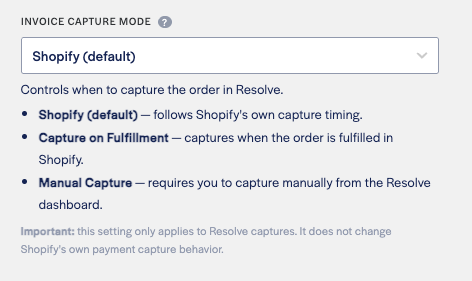
How and when capture happens is controlled by the Invoice Capture Mode setting in your Resolve Shopify App settings. There are three modes:
Set this in the Resolve Pay app settings in your Shopify dashboard.
| Mode | When Resolve captures the invoice | Requires |
|---|---|---|
| Shopify (default) | Follows Shopify's own Payment capture method setting (Settings > Payments) | — |
| Capture on Fulfillment | On the first fulfillment created in Shopify | Resolve Sync App with fulfillment webhooks enabled |
| Manual Capture | When you capture the invoice from your Resolve dashboard | — |
Note: These are two independent settings. Shopify's Payment capture method controls when the order is captured in Shopify. Resolve's Invoice Capture Mode controls when the invoice is captured in Resolve. Neither influences the other.
Capture on Fulfillment and Manual Capture are not covered by Shopify Test Mode. Under either mode a test order can produce a real capture. See the Test Mode warning in Test your integration before you choose one.
Resolve captures the charge when Shopify triggers its own capture, following your Shopify Payment capture method setting (Settings > Payments). Use this mode if you want Shopify to remain the single place that controls capture timing.
Resolve defers capture until a fulfillment event is received from Shopify. The charge is captured automatically when the first fulfillment is created for the order in Shopify, regardless of whether the order is partially or fully fulfilled.
Prerequisites: This mode requires the Resolve Sync App to be installed with fulfillment webhooks enabled. If fulfillment sync is disabled, this option will be greyed out in the settings dropdown.
Note: Capture fires on the first fulfillment event and captures the full authorized amount. Partial capture is not supported, so a partially fulfilled Shopify order still captures the whole order amount. If you need to adjust the amount after capture, issue a refund or credit note from Shopify.
Resolve never auto-captures. You must manually capture the invoice from the Resolve dashboard for each order. Use this mode when you need full control over when the buyer's billing cycle begins.
Warning: Capturing an invoice in the Resolve dashboard does not trigger a corresponding capture in Shopify. You must update the order status in Shopify yourself.
Capture on Fulfillment and Manual Capture intentionally let Shopify capture the payment before Resolve does. During that window Shopify considers the payment captured while Resolve is still holding the invoice not yet captured, and the buyer's credit line is held against the authorization.
Because Shopify decides which request to send us based on its view of the payment, a cancellation during that window arrives at Resolve as a refund request rather than a void. Resolve recognises this and cancels the invoice that has not been captured instead of issuing a credit note. Two consequences follow, both covered below: partial refunds are not supported before capture, and Shopify Test Mode no longer prevents a real capture.
If you do not need deferred capture, stay on Shopify (default) — capture, cancel and refund all behave the way Shopify's own documentation describes.
Always start in Shopify. What Resolve does depends on whether the invoice has been captured yet. Cancelling, voiding, refunding and partially refunding are all irreversible — Resolve cannot reinstate a released authorization or reverse a credit note.
| What you do in Shopify | What happens in Resolve |
|---|---|
| Cancel the order and issue a full refund | The Resolve invoice is cancelled. The buyer's credit line is released. Any customer fees added at checkout are waived. |
| Cancel the order and decline the refund | Shopify sends Resolve nothing, so the invoice stays open. Cancel it from your Resolve dashboard — see Cancelling from the Resolve dashboard. |
| Issue a partial refund | Not supported. The refund fails in Shopify with "A partial refund can't be processed on an invoice that hasn't been captured yet." The invoice is untouched. Cancel the order in full instead, or fulfill it first and then refund. |
| Refund an order whose invoice was already cancelled or voided in Resolve | The refund completes in Shopify and nothing changes in Resolve. Safe to retry. |
| Fulfill an order whose invoice was already cancelled in Resolve | No capture happens. The invoice stays cancelled. |
| What you do in Shopify | What happens in Resolve |
|---|---|
| Full refund | A credit note is issued against the invoice. |
| Partial refund | A credit note is issued for the refunded amount. |
This is the same behaviour in every capture mode — once the invoice is captured, a refund in Shopify becomes a credit note in Resolve.
Open the invoice in your Resolve dashboard and select the Checkout events tab to see every request Shopify sent for that order — checkout, capture, refund, void — with when it was requested, when it completed, and its status.
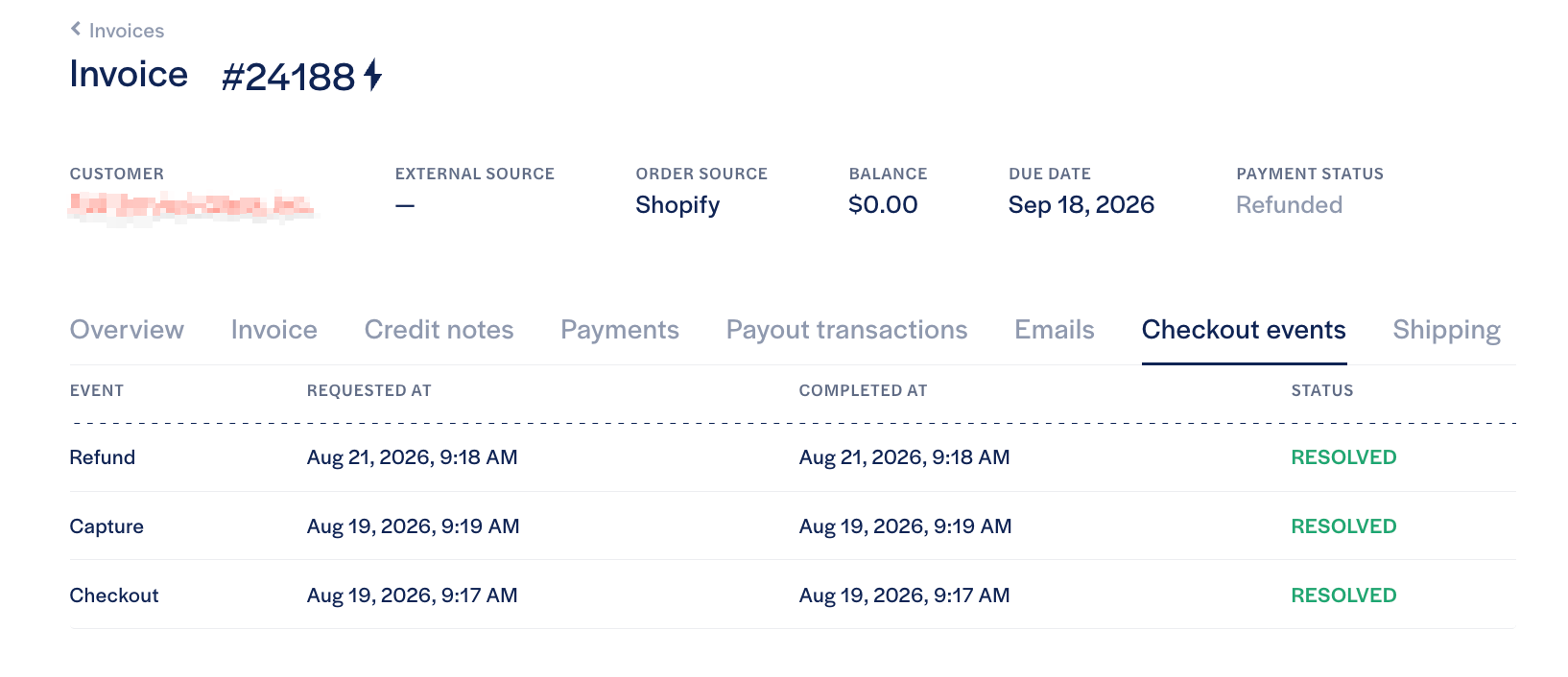
Check here first whenever Shopify and Resolve appear to disagree. An action that is missing from this list never reached Resolve, so there is nothing on the Resolve side to explain — a cancellation with the refund declined is the common case, and the invoice has to be cleared from your dashboard. An action that is listed tells you how Resolve applied it and whether it succeeded.
Issuing a credit note directly in Resolve is disabled for Shopify-sourced invoices. The action appears greyed out with the tooltip "Please use Shopify dashboard to execute this action."
Resolve and Shopify do not reconcile refunds against each other. A credit note issued in Resolve plus a refund issued later in Shopify would both be applied, silently crediting the buyer twice. Initiating every refund from Shopify keeps a single source of truth.
Cancel and Void are available on Shopify-sourced invoices in your Resolve dashboard, from both the invoice list and the invoice detail page. Use them to clear an invoice that Shopify never told us about — most commonly an order cancelled in Shopify with the refund declined.
Cancelling or voiding in Resolve does not reach Shopify. The order stays paid in Shopify and the buyer is not refunded. If the buyer is owed money, you must also refund the order in Shopify. The same applies to capturing an invoice manually in Resolve — the order status in Shopify is not updated.
- Cancel applies to an invoice that has not been captured. It releases the buyer's credit line.
- Void applies to a sent invoice with no payments against it.
- Both waive any outstanding customer fees on the invoice — buyer-paid MDR, terms extension and installment fees. The confirmation dialog names the exact amount before you confirm, and nothing is waived unless the cancellation itself succeeds.
- A cancelled invoice can never be captured afterwards, including by a later fulfillment in Shopify.